> For the complete documentation index, see [llms.txt](https://kbase.whitelabel-loyalty.com/developer/llms.txt). Markdown versions of documentation pages are available by appending `.md` to page URLs; this page is available as [Markdown](https://kbase.whitelabel-loyalty.com/developer/guides/enable-users-to-extract-value-burn/getting-and-redeeming-rewards.md).
# Getting & redeeming rewards
Learn how to enable users to extract value from your loyalty program through the purchase and redemption of rewards.
{% hint style="info" %}
Read the introductory article [Enable users to extract value (burn)](/developer/guides/enable-users-to-extract-value-burn.md) first.
{% endhint %}
## Overview
This guide will show you how to integrate reward purchase, redemption, and validation in your app using WLL APIs. This assumes you have already setup a few rewards (of either voucher or gift card type) in the Loyalty Engine.
{% hint style="info" %}
For conceptual background, first see:
* [Get started with Rewards](https://kbase.whitelabel-loyalty.com/product/loyalty-engine/rewards-and-points/rewards/get-started-with-rewards)
* [Benefits](https://kbase.whitelabel-loyalty.com/product/loyalty-engine/rewards-and-points/benefits#benefit-lifecycle)
{% endhint %}
Users can spend their points to purchase rewards (benefits). The real-world value is then either:
* provided by a third-party provider
* handled by WLL (e.g., redirecting the user to a partner website)
* handled by your own systems (e.g., WLL vouchers flow integrated into a POS)
More on this later.
In the terminology of the WLL platform a “Reward” is a description of some real-world value which a end-user could get. It has two main functions:
1. **Marketing container:** providing a container for marketing assets such as images, descriptions, terms and conditions
2. **Purchase criteria:** specifying the requirements for an end-user to get it, e.g. points cost, tier status, audience membership
There are multiple types of reward which reflect the various methods for delivering value to end-users. All rewards (except static offers) support the purchase method which ensures the user meets the requirements for the reward and deducts any points necessary from the user’s balance.Some types of reward generate a “Benefit” as a result of purchasing the reward. Benefits are uniquely linked to the purchasing user, they provide a means for the user to actually get some real-world value.Change hint typeAn analogy which may be helpful for readers familiar with software: a Reward is similar to a “class”, and a Benefit is an instance of that class.There is a different type of benefit corresponding to each different type of reward which generates benefits. Broadly the types of benefit can be categorized into Vouchers and Gift Cards.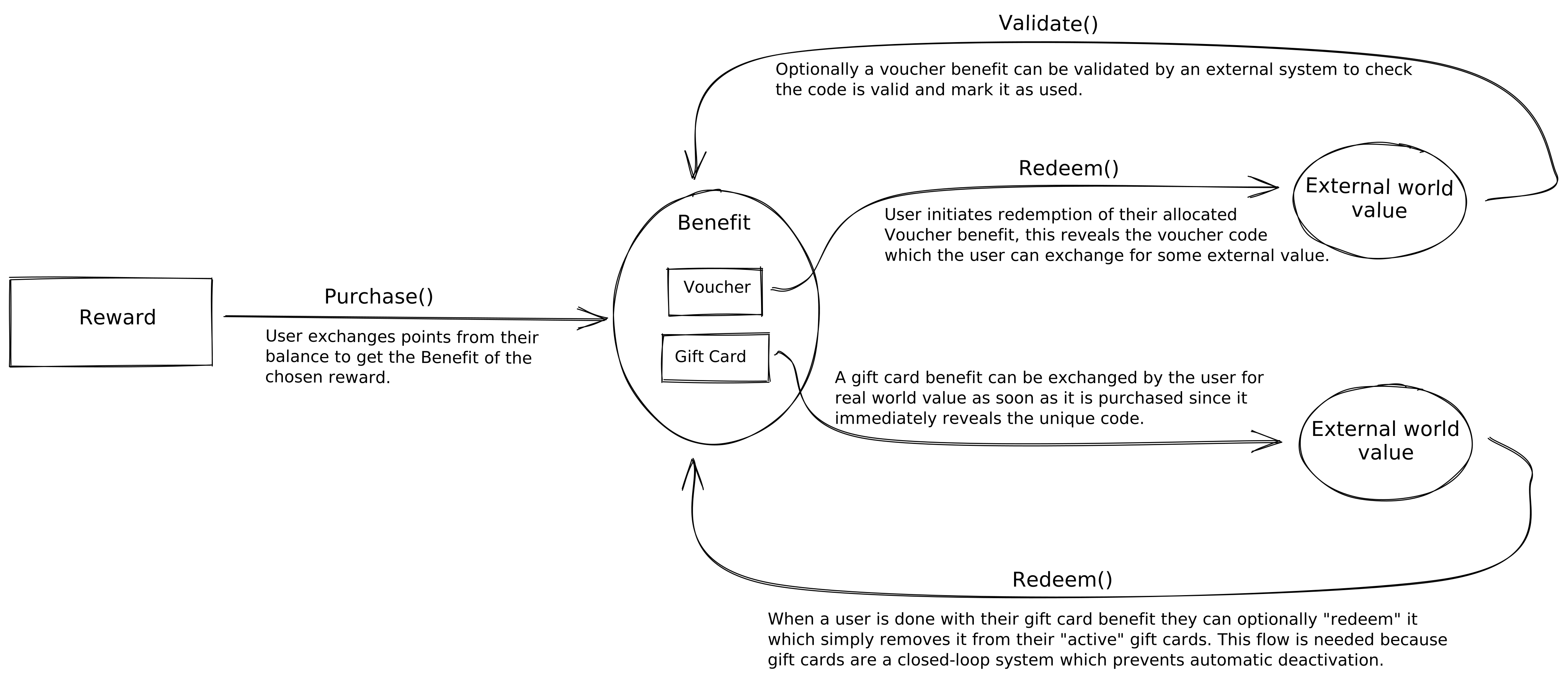Voucher benefits are fulfilled by a system external to WLL, typically a ePOS, eCommerce, or shop staff member. They function by assigning a voucher code with an expiry date to that user during the purchase which can only be accessed by calling the “redemption” method.See for more details on types of vouchers and their redemption flows.With Gift Card benefits, WLL handles fulfilment on your behalf. There are typically three options for fulfilment: direct email, URL, or raw text code. Some brands only support one or the other of those options, but there’s plenty of choice so you can choose the delivery method that works best for you and then just select the brands which support that method.See for more details on gift card type of rewards.The lifecycle of a benefit is:
1. **Purchase** — Points are deducted, benefit created. Purchase a reward
2. **Redeem** — User redeems the benefit (e.g. voucher or gift card). In some voucher flows, this is usually when the user is ready to use the voucher and "redeems" it to view the voucher code. Redeem a benefit
3. **Validation** — Optional (mostly used for vouchers with codes), check if a voucher was successfully used. In some voucher flows, this is when a voucher code accepting system (eg a POS terminal) validates and burns the voucher, thus completing the voucher usage flow. Validate a voucher code
See the [Benefits](https://kbase.whitelabel-loyalty.com/product/loyalty-engine/rewards-and-points/benefits#benefit-lifecycle) for details.
***
## Implementation steps
{% hint style="info" %}
#### API References
Use the user auth version of these APIs in your application, except validate voucher which uses an admin token and the userIdentifier as it is meant to be called from an external system.
* [List rewards](https://docs.whitelabel-loyalty.com/rewards.html#rewards-rewards-collection)
* [Purchase reward](https://docs.whitelabel-loyalty.com/rewards.html#commands-reward-purchases)
* [Retrieve wallet](https://docs.whitelabel-loyalty.com/rewards.html#users-active-user-wallet)
* [Redeem benefit](https://docs.whitelabel-loyalty.com/rewards.html#commands-benefit-redemptions)
* [Validate voucher](https://docs.whitelabel-loyalty.com/rewards.html#commands-voucher-validations)
{% endhint %}
{% stepper %}
{% step %}
### Fetch available rewards
Let the user browse rewards available to them.
```bash
curl -X GET "https://api.rewards.wlloyalty.net/v1/rewards" \
-H "Authorization: Bearer " \
-H "X-Api-Key: " \
-H "Content-Type: application/json"
```
* Returns a list of rewards the user can purchase.
* Filter or sort by type (e.g., voucher rewards) for the UI.
{% endstep %}
{% step %}
### Purchase a reward
When the user selects a reward, purchase it to deduct points and create a benefit.
```bash
curl -X POST "https://api.rewards.wlloyalty.net/v1/commands/purchase_reward" \
-H "Authorization: Bearer " \
-H "X-Api-Key: " \
-H "Content-Type: application/json" \
-d '{
"rewardId": ""
}'
```
* Deducts points from the wallet.
* Creates a benefit linked to the user.
{% endstep %}
{% step %}
### Display user's benefits
Show the list of benefits (both vouchers and non-vouchers) assigned to the user. For more information, see [Present a user’s loyalty status](/developer/guides/present-a-users-loyalty-status.md).
```bash
curl -X GET "https://api.rewards.wlloyalty.net/v1/benefits" \
-H "Authorization: Bearer " \
-H "X-Api-Key: " \
-H "Content-Type: application/json"
```
* You can filter to only unredeemed benefits with `?redeemable=true`.
* Use this to display user's redeemable benefits (vouchers and non-vouchers) in the user’s profile or “My Rewards” section.
{% endstep %}
{% step %}
### Redeem a benefit
When the user clicks “Redeem” in your UI, call the redeem API to reveal any associated voucher code or URL.
```bash
curl -X POST "https://api.rewards.wlloyalty.net/v1/commands/redeem_benefit" \
-H "Authorization: Bearer " \
-H "X-Api-Key: " \
-H "Content-Type: application/json" \
-d '{
"benefitId": ""
}'
```
* For WLL vouchers, this returns a code (e.g., `SAVE20XYZ`).
* Show the code to the user so they can present it at checkout or enter it online.
* Handle redirects for Gift card type of benefits.
{% endstep %}
{% step %}
### Validate voucher code in POS (optional)
See [Redeeming vouchers](/developer/guides/integrate-with-pos/redeeming-vouchers.md) in our [Integrate with POS](/developer/guides/integrate-with-pos.md) guide.
{% endstep %}
{% endstepper %}
***
## Putting it together
* **In your app:** Fetch rewards → user selects → purchase → benefit created → redeem to reveal code.
* **In external system (POS):** Accept code, optionally validate via API to burn.
***
## Alternative approach: Direct rewards
In some setups, points are not used as an intermediate step. Instead, users may receive rewards (benefits) directly when events occur, without having to spend points or 'purchase a reward'.
To achieve this, you can [create a reactor](https://kbase.whitelabel-loyalty.com/product/loyalty-engine/reactors/creating-reactors) which directly gives user's a reward when an event occurs using the [Give reward reaction](https://kbase.whitelabel-loyalty.com/product/loyalty-engine/campaigns/reactions#give-reward).
You can also use points as an intermediate store, but setup [Reward auto-purchase](https://kbase.whitelabel-loyalty.com/product/loyalty-engine/rewards-and-points/points/reward-auto-purchase) to automatically convert them to a benefit when a particular points threshold is met.